
This Excel macro creates a “Chart Index” worksheet that auto-generates a centralised listing of all the workbook’s charts, creates a preview icon and hyperlinks to the original.
You can add this macro to any workbook and running it will give you an Index sheet for all those charts for quick, easy access.
Example “Chart Index”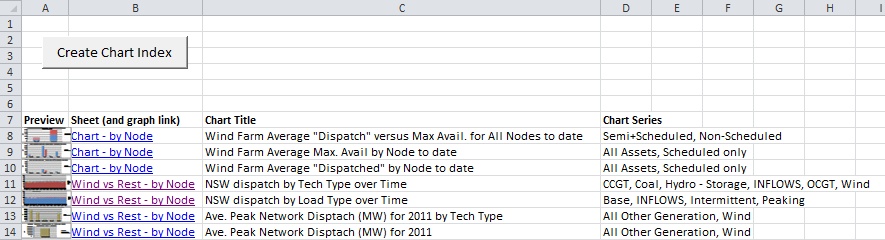
Step 1: Hold down the ALT + F11 keys in Excel, and it opens the Microsoft Visual Basic for Applications window.
Step 2: Click Insert > Module, and paste the following macro in the Module Window.
Option Explicit
Public Sub CreateChartIndex()
' Macro to create a "Chart Index" worksheet that auto generates a listing of all
' the workbook's Charts, creates a preview icon and hyperlinks to the original
' Set these inputs here (or set them as procedural inputs)
Const SHEET_NAME_CHART_INDEX As String = "Chart Index"
Const RANGE_ROW_CHART_INDEX As String = 7
Const CHART_PREVIEW As Boolean = True
Dim count As Integer
Dim sht As Worksheet
Dim shtIndex As Worksheet
Dim strSheetName As String
Dim cht As Chart
Dim chtObj As ChartObject
Dim shtChartTitle As String
Dim srs As Series
Dim strSeriesNames As String
Dim shp1 As ShapeRange
Dim shp2 As ShapeRange
Dim pic As Picture
Application.ScreenUpdating = False ' Speed optimisation
Application.EnableCancelKey = xlDisabled ' Excel Bug Fix for preventing random "Code execution has been interrupted" errors
' Create "Chart Index" sheet
If WorksheetExists(SHEET_NAME_CHART_INDEX) = False Then
Sheets.Add Before:=Sheets(1)
Set shtIndex = Sheets(1)
shtIndex.Name = SHEET_NAME_CHART_INDEX
Else
Set shtIndex = Sheets(SHEET_NAME_CHART_INDEX)
End If
' Delete All
Cells.Select
Selection.Delete
For Each pic In ActiveSheet.Pictures
pic.Delete
Next pic
' Add macro button (to run this macro)
shtIndex.Buttons.Add(20, 20, 130, 30).Select
shtIndex.Buttons(1).Name = "CreateChartIndex"
Selection.OnAction = "CreateChartIndex"
Selection.Characters.Text = "Create Chart Index"
Selection.Characters(Start:=1, Length:=18).Font.Size = 14
count = RANGE_ROW_CHART_INDEX
shtIndex.Select
shtIndex.Range("A1").Select
' Clear any previous Chart Index and create new Headers
With shtIndex
.Range("A" & count).Value = "Preview"
.Range("B" & count).Value = "Sheet (and graph link)"
.Range("C" & count).Value = "Chart Title"
.Range("D" & count).Value = "Chart Series"
.Range("A" & count).Font.Bold = True
.Range("B" & count).Font.Bold = True
.Range("C" & count).Font.Bold = True
.Range("D" & count).Font.Bold = True
End With
' Cycle Sheets
For Each sht In ActiveWorkbook.Sheets
strSheetName = sht.Name
If strSheetName <> SHEET_NAME_CHART_INDEX Then
' Cycle Charts
For Each chtObj In sht.ChartObjects
count = count + 1
Set cht = chtObj.Chart
If cht.HasTitle Then
shtChartTitle = cht.ChartTitle.Text
Else
shtChartTitle = "NA"
End If
' Find Top Left cell under chart (to act as a hyperlink ref)
Dim rge As Range
Set rge = Range(Cells(chtObj.TopLeftCell.Row, chtObj.TopLeftCell.Column), _
Cells(chtObj.BottomRightCell.Row, chtObj.BottomRightCell.Column))
' Cycle Chart Series
' Get List of Series for a given chart
strSeriesNames = ""
For Each srs In cht.SeriesCollection
strSeriesNames = strSeriesNames & srs.Name & ", "
Next
strSeriesNames = Left(strSeriesNames, Len(strSeriesNames) - 2)
' Print information for a particular graph to "Chart Index"
shtIndex.Hyperlinks.Add Anchor:=shtIndex.Range("B" & count), Address:="", SubAddress:="'" & _
strSheetName & "'!" & rge.Address, TextToDisplay:=strSheetName
shtIndex.Range("C" & count).Value = shtChartTitle
shtIndex.Range("D" & count).Value = strSeriesNames
' Create a chart preview
If CHART_PREVIEW Then
' Copy chart and paste as a GIF
cht.ChartArea.Copy
Range("A1").Select
shtIndex.PasteSpecial Format:="Picture (Enhanced Metafile)", Link:=False _
, DisplayAsIcon:=False
' Resize chart (smaller)
Set shp1 = Selection.ShapeRange
shp1.Height = shtIndex.Rows(count).Height
shp1.LockAspectRatio = msoFalse
shp1.Width = shtIndex.Columns(1).Width
' Copy paste GIF (to make underlying object size small (memory saving))
Selection.Copy
Range("A1").Select ' object deselection loses reference to original larger chart
shtIndex.PasteSpecial Format:="Picture (GIF)", Link:=False _
, DisplayAsIcon:=False
Set shp2 = Selection.ShapeRange
shp1.Delete
' Set location
shp2.Left = shtIndex.Range("A" & count).Left '- shp2.Width
shp2.Top = shtIndex.Range("A" & count).Top
Range("A1").Select
End If
Next
End If
Next sht
' Sheet Formating
Columns("B:C").EntireColumn.AutoFit
ActiveSheet.Shapes("CreateChartIndex").Width = 140
Application.ScreenUpdating = True
Application.EnableCancelKey = xlInterrupt ' Excel Bug Fix for preventing random "Code execution has been interrupted" errors
End Sub
Private Function WorksheetExists(shtName As String) As Boolean
' Check if a worksheet already exists (not an in-built, excel function)
Dim sht As Worksheet
Dim rtn As Boolean
rtn = False
shtName = UCase(shtName)
For Each sht In ThisWorkbook.Sheets
If UCase(sht.Name) = shtName Then
rtn = True
Exit For
End If
Next
WorksheetExists = rtn
End Function
Public Sub CreateChartIndex()
' Macro to create a "Chart Index" worksheet that auto generates a listing of all
' the workbook's Charts, creates a preview icon and hyperlinks to the original
' Set these inputs here (or set them as procedural inputs)
Const SHEET_NAME_CHART_INDEX As String = "Chart Index"
Const RANGE_ROW_CHART_INDEX As String = 7
Const CHART_PREVIEW As Boolean = True
Dim count As Integer
Dim sht As Worksheet
Dim shtIndex As Worksheet
Dim strSheetName As String
Dim cht As Chart
Dim chtObj As ChartObject
Dim shtChartTitle As String
Dim srs As Series
Dim strSeriesNames As String
Dim shp1 As ShapeRange
Dim shp2 As ShapeRange
Dim pic As Picture
Application.ScreenUpdating = False ' Speed optimisation
Application.EnableCancelKey = xlDisabled ' Excel Bug Fix for preventing random "Code execution has been interrupted" errors
' Create "Chart Index" sheet
If WorksheetExists(SHEET_NAME_CHART_INDEX) = False Then
Sheets.Add Before:=Sheets(1)
Set shtIndex = Sheets(1)
shtIndex.Name = SHEET_NAME_CHART_INDEX
Else
Set shtIndex = Sheets(SHEET_NAME_CHART_INDEX)
End If
' Delete All
Cells.Select
Selection.Delete
For Each pic In ActiveSheet.Pictures
pic.Delete
Next pic
' Add macro button (to run this macro)
shtIndex.Buttons.Add(20, 20, 130, 30).Select
shtIndex.Buttons(1).Name = "CreateChartIndex"
Selection.OnAction = "CreateChartIndex"
Selection.Characters.Text = "Create Chart Index"
Selection.Characters(Start:=1, Length:=18).Font.Size = 14
count = RANGE_ROW_CHART_INDEX
shtIndex.Select
shtIndex.Range("A1").Select
' Clear any previous Chart Index and create new Headers
With shtIndex
.Range("A" & count).Value = "Preview"
.Range("B" & count).Value = "Sheet (and graph link)"
.Range("C" & count).Value = "Chart Title"
.Range("D" & count).Value = "Chart Series"
.Range("A" & count).Font.Bold = True
.Range("B" & count).Font.Bold = True
.Range("C" & count).Font.Bold = True
.Range("D" & count).Font.Bold = True
End With
' Cycle Sheets
For Each sht In ActiveWorkbook.Sheets
strSheetName = sht.Name
If strSheetName <> SHEET_NAME_CHART_INDEX Then
' Cycle Charts
For Each chtObj In sht.ChartObjects
count = count + 1
Set cht = chtObj.Chart
If cht.HasTitle Then
shtChartTitle = cht.ChartTitle.Text
Else
shtChartTitle = "NA"
End If
' Find Top Left cell under chart (to act as a hyperlink ref)
Dim rge As Range
Set rge = Range(Cells(chtObj.TopLeftCell.Row, chtObj.TopLeftCell.Column), _
Cells(chtObj.BottomRightCell.Row, chtObj.BottomRightCell.Column))
' Cycle Chart Series
' Get List of Series for a given chart
strSeriesNames = ""
For Each srs In cht.SeriesCollection
strSeriesNames = strSeriesNames & srs.Name & ", "
Next
strSeriesNames = Left(strSeriesNames, Len(strSeriesNames) - 2)
' Print information for a particular graph to "Chart Index"
shtIndex.Hyperlinks.Add Anchor:=shtIndex.Range("B" & count), Address:="", SubAddress:="'" & _
strSheetName & "'!" & rge.Address, TextToDisplay:=strSheetName
shtIndex.Range("C" & count).Value = shtChartTitle
shtIndex.Range("D" & count).Value = strSeriesNames
' Create a chart preview
If CHART_PREVIEW Then
' Copy chart and paste as a GIF
cht.ChartArea.Copy
Range("A1").Select
shtIndex.PasteSpecial Format:="Picture (Enhanced Metafile)", Link:=False _
, DisplayAsIcon:=False
' Resize chart (smaller)
Set shp1 = Selection.ShapeRange
shp1.Height = shtIndex.Rows(count).Height
shp1.LockAspectRatio = msoFalse
shp1.Width = shtIndex.Columns(1).Width
' Copy paste GIF (to make underlying object size small (memory saving))
Selection.Copy
Range("A1").Select ' object deselection loses reference to original larger chart
shtIndex.PasteSpecial Format:="Picture (GIF)", Link:=False _
, DisplayAsIcon:=False
Set shp2 = Selection.ShapeRange
shp1.Delete
' Set location
shp2.Left = shtIndex.Range("A" & count).Left '- shp2.Width
shp2.Top = shtIndex.Range("A" & count).Top
Range("A1").Select
End If
Next
End If
Next sht
' Sheet Formating
Columns("B:C").EntireColumn.AutoFit
ActiveSheet.Shapes("CreateChartIndex").Width = 140
Application.ScreenUpdating = True
Application.EnableCancelKey = xlInterrupt ' Excel Bug Fix for preventing random "Code execution has been interrupted" errors
End Sub
Private Function WorksheetExists(shtName As String) As Boolean
' Check if a worksheet already exists (not an in-built, excel function)
Dim sht As Worksheet
Dim rtn As Boolean
rtn = False
shtName = UCase(shtName)
For Each sht In ThisWorkbook.Sheets
If UCase(sht.Name) = shtName Then
rtn = True
Exit For
End If
Next
WorksheetExists = rtn
End Function
Step 3: Press the F5 key to run this macro (“CreateChartIndex”).